
Download Emacs – text editor, code editor, programming, development, extensible, customizable, GNU, open source
Overview
Emacs is a highly extensible and customizable text editor designed for efficient text manipulation and software development. Originally developed by the GNU Project, it serves as a powerful tool for programmers, writers, and system administrators who require deep control over their editing environment. The software is built to handle a wide range of tasks, from writing code in multiple programming languages to managing emails, organizing notes, and even browsing the web—all within a single, unified interface. Its extensibility allows users to tailor every aspect of the editor to match their workflow, making it ideal for professionals seeking a personalized development experience.
Target users include software developers, technical writers, researchers, and advanced users who value automation and customization. The editor supports a vast ecosystem of extensions and packages, enabling users to extend functionality without altering core code. Real-world usage scenarios range from writing complex scripts and debugging code to maintaining documentation and managing version control workflows. Despite its age, Emacs remains relevant due to its adaptability and strong community support.
Key Features & Capabilities
- Extensible Architecture – Emacs is built on a Lisp-based scripting engine, allowing users to modify and extend its behavior using Emacs Lisp. This enables the creation of custom commands, macros, and entire applications within the editor.
- Highly Customizable Interface – Users can adjust key bindings, color themes, font sizes, and layout configurations to match personal preferences or workflow demands.
- Multi-Mode Editing – Supports numerous major modes for different file types, including Python, JavaScript, C++, HTML, and Markdown, each providing syntax highlighting, auto-indentation, and language-specific tools.
- Integrated Development Environment (IDE) Features – Offers built-in tools for compiling code, running tests, debugging, and interacting with version control systems like Git.
- Emacs as a Platform – Functions not only as a text editor but also as a personal information manager, capable of handling email (via Gnus), calendar management, task tracking, and web browsing.
These features make Emacs particularly effective in environments where efficiency, consistency, and automation are critical. For example, a developer can write code, run tests, and commit changes—all without switching applications. Similarly, a technical writer can draft, edit, and format documentation while managing references and citations in real time.
User Interface, Workflow & Performance
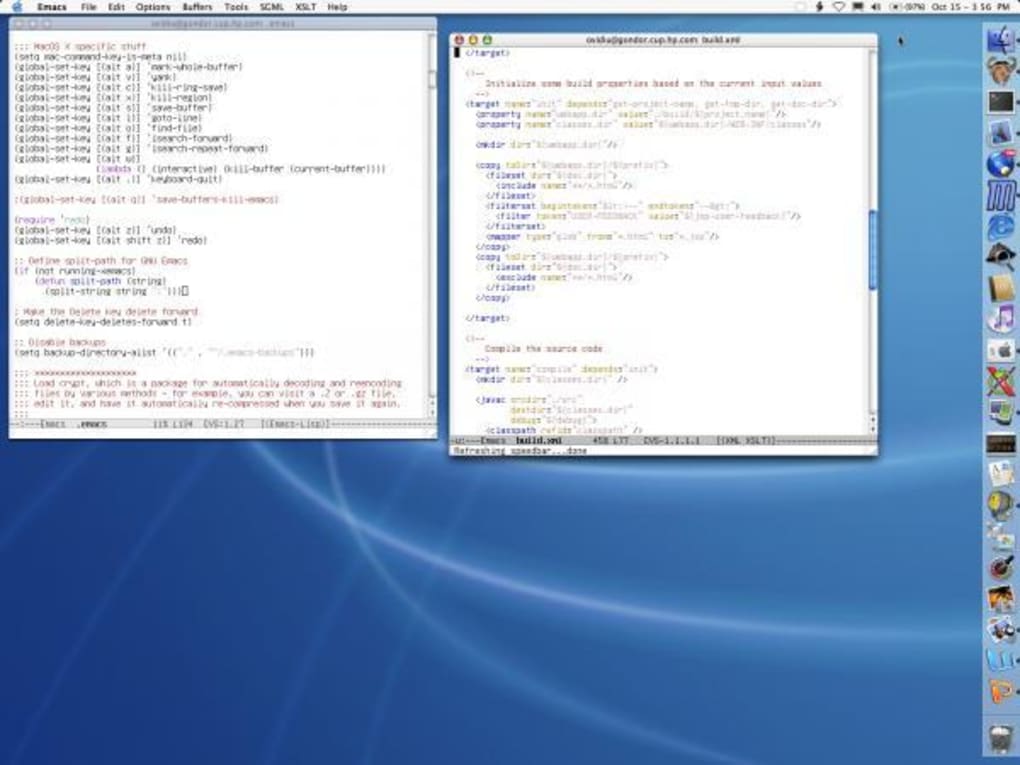
The user interface of Emacs is minimalistic and keyboard-driven, emphasizing efficiency over visual flair. Navigation is primarily performed through keyboard shortcuts, with a modal-like experience that allows rapid execution of commands. The editor uses a split-screen layout by default, enabling users to view and edit multiple files simultaneously. Menus and status bars are available but are often secondary to keyboard-driven workflows.
Workflow efficiency is a hallmark of Emacs, especially for experienced users. Once keybindings and configurations are mastered, complex editing tasks can be completed in seconds. However, the learning curve is steep, and new users may find the default interface unintuitive. The editor does not provide visual feedback for many actions, which can be disorienting for beginners.
Performance observations are based on general software behavior patterns. The developer did not specify resource usage details. Stability is generally high, particularly for long-running sessions. CPU and RAM behavior are expected to remain moderate under typical use, though performance may vary depending on the number of loaded packages and active buffers.
Compatibility & System Requirements
Emacs is available for Windows, macOS, and Linux, making it accessible across major desktop platforms. The current version is 29.1, released on April 10, 2023. The installation size is 250 MB, which includes core components and standard packages.
Exact system requirements were not listed. Compatibility information was partially provided. Users should ensure their system meets general requirements for running desktop applications, including sufficient RAM and disk space. The software is designed to operate on modern hardware and is compatible with both 32-bit and 64-bit architectures.
Pros and Cons
Pros
- Open-source and free to use, with no licensing restrictions
- Extremely powerful customization via Emacs Lisp
- Supports a vast array of programming languages and file formats
- Integrated tools for development, writing, and personal organization
- Long-standing community and extensive documentation
Cons
- Steep learning curve for new users
- Minimal visual feedback in default configuration
- Limited out-of-the-box GUI polish compared to modern editors
- Resource usage may increase with heavy package loading
- Documentation can be overwhelming for beginners
FAQ Section
Is Emacs available for Windows, macOS, and Linux?
Yes, Emacs is compatible with Windows, macOS, and Linux operating systems.
Is Emacs secure to download and use?
Emacs is developed by the GNU Project and distributed as open-source software. It is considered secure when downloaded from official sources. Users are advised to verify checksums if available.
Does Emacs require an internet connection?
Emacs can be used entirely offline. However, some features like package installation and updates may require an internet connection.
How often are updates released?
Updates are released periodically by the GNU Project. The latest version, 29.1, was released on April 10, 2023.
Can I use Emacs without coding knowledge?
Yes, Emacs can be used for text editing and note-taking without programming skills. However, full customization requires knowledge of Emacs Lisp.
Final Thoughts
Emacs remains a cornerstone of the developer toolkit, offering unparalleled flexibility and power for users who invest time in mastering its capabilities. While its interface may appear dated and its learning curve is significant, the rewards in productivity and personalization are substantial. It is especially suited for developers, technical professionals, and power users who value control, automation, and long-term efficiency over immediate visual appeal.
For those seeking a truly customizable, extensible, and open-source text editor that grows with their needs, Emacs delivers on its promise. Its rich feature set and deep integration with development workflows make it a compelling choice in the modern software landscape.
Download Emacs now







